Audio Cutter: Why Abrupt Cuts Click and Pop
When you trim a file in an audio cutter, a click at the edit means the hard cut stopped or started the waveform mid-swing: the sample value jumps in one step, and you hear that jump as a click. A fade of a few milliseconds usually removes it. Where the click sits tells you whether the edit caused it at all, and which fix fits.
What actually happens at a hard cut
Digital audio is a long list of samples, each one a number describing where the speaker should be at that instant. Played in order, those numbers trace the smooth curve you see in a waveform, swinging above and below a center line that represents silence.
A cut ends that list wherever you put it. If the last sample sits high on a peak, the next value is effectively zero, because the audio has stopped. The speaker is told to travel from that position back to rest almost instantly. The same thing happens in reverse when a clip opens on a sample far from zero.
That vertical step is heard as a tick whatever the music is doing, because a sudden step carries energy across a wide range of frequencies. A bass note and a flute cut at the wrong moment can both leave a similar click. Any audio trimmer or MP3 cutter that makes a straight cut can do this, since the noise comes from where the edit lands and not from the file format.
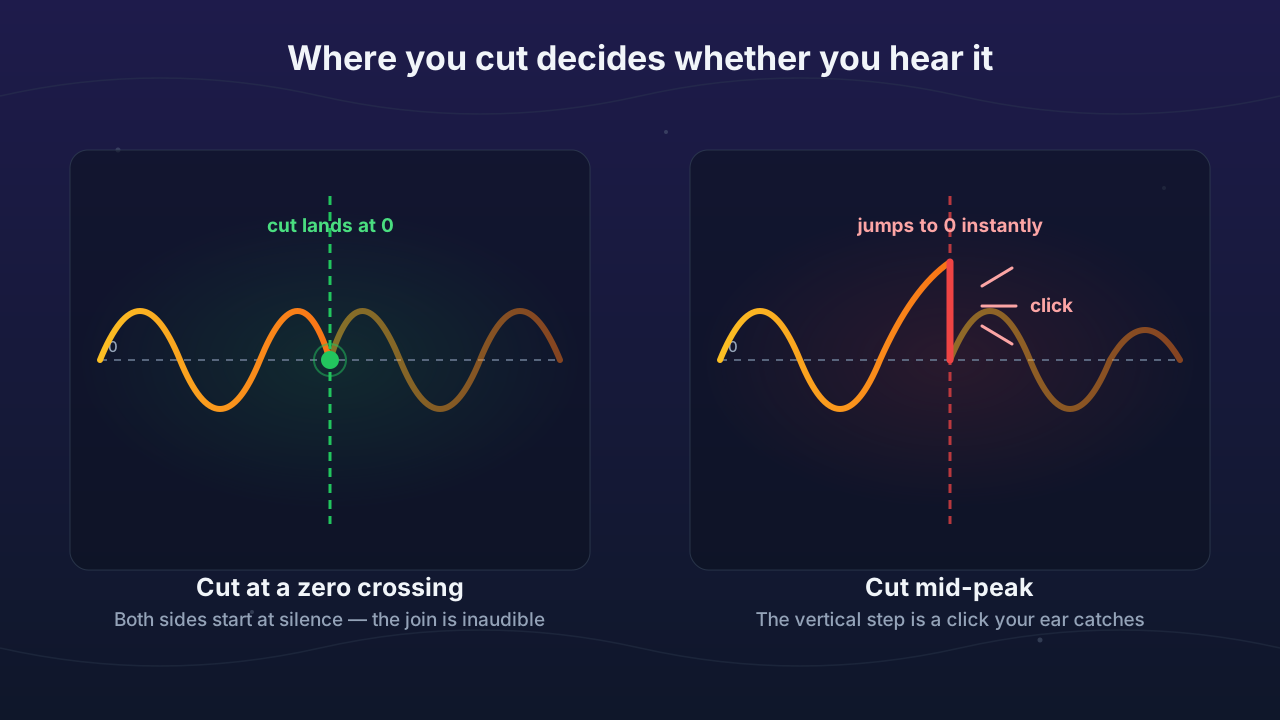
The diagram shows the ideal case. Real material doesn't always behave that neatly.
Why a zero crossing helps but doesn't always work
A zero crossing is a point where the waveform passes through the center line. Cut there and there is no step to hear, which is why editors offer tools for finding one. It is good advice with four real limits:
- Stereo. The left and right channels often don't cross zero at the same moment. The Audacity manual on zero crossings warns that one channel can still click at the edit point.
- Joins. Two clips can both sit at zero where they meet and still head in opposite directions, one rising and one falling. The level matches but the slope doesn't, which leaves a smaller kink.
- DC offset. A recording with DC offset sits slightly above or below the center line, so even its quiet passages may not rest at true zero.
- Dense mixes. A full arrangement crosses zero constantly, but the signal is loud and moving fast at each crossing, so stopping there can still sound abrupt.
Why a very short fade is the reliable fix
A fade ramps the level down to zero, or up from it, so the edge of the clip reaches silence whatever the waveform was doing at that point. It handles stereo, DC offset and busy mixes in one move.
A range of 5–10 ms is a safe place to start, which is about 220–441 samples at 44.1 kHz. Shorter values can work too. Sound on Sound's guide to removing clicks with crossfades suggests fades of 1–3 ms and crossfades of 2–4 ms, and the Audacity fading documentation simply says a few milliseconds. A fade this short is too brief to hear as a fade.
Low notes can need more room. One cycle of a 50 Hz tone lasts 20 ms, so a 5 ms fade covers only a quarter of a cycle. If a low thump survives, try a longer fade. Treat that as a rule of thumb and let your ears decide. Some DAWs can add very short fades automatically, but settings and defaults vary, so check yours.
Diagnosing your click
Play the original file across the same moment first. If the noise is there too, your edit didn't cause it.
| Where you hear it | Likely cause | What to do |
|---|---|---|
| Very start of the clip | The clip opens mid-swing | Add a short fade in, or trim back to a quieter moment |
| Very end of the clip | The clip stops mid-swing | Add a short fade out, or end on a quieter moment |
| At a join between two clips | The waveforms don't line up at the seam | Crossfade the join by a few milliseconds |
| Once per repeat in a loop | The loop's end doesn't meet its start | Snap the loop points to zero crossings and add a seam crossfade |
| Scattered through the whole file, and present in the original | Not an edit problem: possibly audio clipping or mouth noise | Treat the source problem; re-cutting won't help |
| A low thud on spoken P and B sounds | A plosive hitting the microphone | Follow the guide to removing plosives and pops |
Fixing clicks from an audio cutter with free browser tools
Vocal Cut's tools run in your browser, so your audio never leaves your device. Each one suits a different part of this problem.
Audio Cutter makes a straight cut. It applies no fade and doesn't snap to zero crossings. The Trim Start point and Trim End point sliders move in 0.1 s steps, which is 4,410 samples at 44.1 kHz. A 100 Hz tone crosses zero 20 times in that span, so the sliders can't target a specific crossing. Aim for a quiet moment instead and preview it with Play Selection. Then export WAV, MP3 or, in supporting browsers, Opus with the Cut & Download button, and listen to the start and end of the exported file, because the preview can run slightly past your end point and won't reveal a click at the edge. Choose WAV if the file is going on to another tool.
Audio Fade has Fade in and Fade out sliders that also move in 0.1 s steps, so its shortest fade is 0.1 s (100 ms). It cannot do a 5–10 ms micro-fade. The practical workaround is to leave about 0.1 s of extra audio before the first sound you care about and after the last when you trim audio, so the fade happens inside that spare material. Drag the end you don't need to Off, since both fades are on by default. Fade shapes are Smooth, Linear, S-curve and Slow start.
Audio Looper is the one for loop seams. Set the loop points to Snap to zero crossings or Exactly where I put them, then add a Seam crossfade of 0 to 200 ms in 1 ms steps. Place the loop start a little after the beginning of the file, because the crossfade borrows audio from just before it. The guide to looping audio seamlessly covers the details.
Audio Joiner offers Crossfade between tracks, either Off or 0.5–12 s in 0.5 s steps. That suits musical blends more than millisecond de-clicks, as the walkthrough on crossfading between two tracks explains.
For a true 5–10 ms fade inside a file, use a desktop editor. In Audacity, choose Select > At Zero Crossings (shortcut Z) to nudge an edit point, or select a few milliseconds at the edge and apply Effect > Fading > Fade In or Fade Out.
Related guides
For longer, audible fades and how to choose a curve, read how to fade audio in and out. If your concern is what trimming does to sound quality, see how to cut audio without losing quality. The rest of our audio how-to guides cover the neighboring editing jobs.
Frequently asked questions
Why does my audio click when I cut it? Your audio clicks because the cut landed while the waveform was away from the center line, so the signal jumps abruptly to or from silence. The speaker tries to follow that jump almost instantly, and you hear a short tick. Moving the cut to a quieter moment can reduce it, and a fade of a few milliseconds at the edge removes the step.
How long should a fade be to remove a click? A fade of 5–10 ms is a safe starting point for removing a click, and it is too brief to hear as a fade. Sound on Sound suggests that 1–3 ms can be enough. Material with heavy bass may need longer, because one cycle of a 50 Hz tone lasts 20 ms. If a low thump remains, lengthen the fade gradually.
Should I always cut at a zero crossing? No, a zero crossing is helpful but doesn't guarantee a clean edit. Stereo channels often cross zero at different moments, two clips can meet at zero while moving in opposite directions, and DC offset shifts the waveform away from the center line. Cut at a crossing when you can, then add a very short fade if you can still hear a click.
Can noise reduction remove a click caused by an edit? Noise reduction is the wrong tool for a click caused by an edit, and you shouldn't count on it to work. It targets ongoing background sound such as hiss or hum, while an edit click is a single step at one exact point. The direct fix is a very short fade at the edit, or a new cut at a quieter moment.